


Sign Up New Account with HighFlow Energy: How It Works
You've got your electricity bill open, your battery app on your phone and an account application asking for details you rarely use. If you're searching for “sign up new account”, the important question isn't just where to enter your email. It's whether your identity, electricity connection and battery can all be verified without delays.
For a solar and battery household, registration starts an electricity retail relationship and a battery-control arrangement. Preparing the right information helps you understand both before you agree.
Check Your Eligibility Before You Sign Up
To sign up for a new account with HighFlow Energy, you must be a residential homeowner in New South Wales or Queensland with rooftop solar and a compatible home battery. Eligibility starts with equipment you already own, not a future installation.
A Virtual Power Plant, or VPP, is a group of home batteries coordinated so they act together as one grid resource. Bring Your Own Battery, or BYOB, means your existing battery participates rather than being replaced.
How participation works
The arrangement follows four steps:
- Keep your equipment. You bring your existing rooftop solar and battery.
- Join the coordinated fleet. Your compatible battery joins the HighFlow Virtual Power Plant.
- Make spare capacity available. HighFlow supports the grid only when your battery is available, with household needs prioritised.
- Receive your allowance. Your electricity account receives a monthly bill-free electricity allowance, confirmed in writing when you join.
The offer operates in eligible NSW and QLD service areas and works the same way for Energex and Ergon customers. That doesn't mean every installation qualifies. Battery compatibility and connection requirements still need checking.
The HighFlow Energy eligibility check takes a few minutes. Treat its initial result as a starting point, not a substitute for validating your equipment and account records.
A quick self-test
Before starting, answer these questions:
- Ownership: Do you own the home?
- Location: Is it in a NSW or QLD service area?
- Equipment: Is your solar battery installed and working?
A no means an account application isn't the right next step yet. Resolve the ownership, location or equipment issue before providing detailed registration information.
Documents and Details to Have Ready
Details to prepare before you start
| Item | Where to find it | Why it matters |
|---|---|---|
| Legal name and date of birth | Photo ID or existing account records | Must match government records for concession claims |
| Service address and NMI | Electricity bill or meter details | Validated against the service address before activation |
| Solar and battery make, model and full serial number | Battery and inverter labels or installer paperwork | Confirms the battery can join the VPP |
| Inverter and firmware details | Inverter or battery app | Unsupported firmware can block enrolment |
| Direct debit bank details | Your bank account | Direct debit may be required if excess usage or standard fees apply |
| Signed life support registration form | Completed by a registered medical practitioner | Required to register for life support, returned by email |
Your National Metering Identifier, or NMI, identifies the electricity connection. It isn't the same as your retailer account number or the serial number printed on the meter. Copy it from your bill rather than guessing which number the application needs.
For life support registration, download the form from our policies and forms, fill in your details, have a registered medical practitioner complete it, and return it by email. Keep a copy of the completed document.
Prepare information without oversharing
Separate contact information, payment information and technical device information. Each serves a different purpose, so ask why a field is mandatory and whether document details can be verified without retaining an image.
The Australian Government's identity-security guidance for businesses explains privacy responsibilities and electronic document verification. Verification and storing a copy of your identity document aren't necessarily the same thing.
Security check: Type the provider's known website address yourself before entering sensitive details. Don't trust a registration page simply because an unexpected message uses the right logo.
The Australian Cyber Security Centre's scam guidance recommends independently checking suspicious communications. Never send passwords, one-time codes or identity documents through an unexpected link; if you've already submitted details, contact the relevant account or financial institution through a known channel.
Keep clear battery-label photos and a copy of the bill showing your NMI together. They're useful if a reviewer needs to resolve a mismatch.
Review the Terms, Allowance and Cooling-Off Period
Before accepting, check the contract terms, confirmed allowance, charges above that allowance and applicable policies. A description of potential electricity bill reduction isn't enough to assess an electricity contract.
The Australian Energy Regulator's energy-services guidance advises customers to read terms carefully and describes a 10-business-day cooling-off period from signing a new contract, during which cancellation doesn't incur fees.
Keep the pricing documents too. The AER's explanation of energy rights describes disclosure obligations covering offer terms, conditions, prices and consumption information, including price fact sheets and offer summaries. HighFlow provides Basic Plan Information Documents for its residential market offers.
Compare the whole arrangement
| Check | What it means for your decision |
|---|---|
| Allowance | Confirm its written amount and how it applies to your account |
| Extra consumption | Usage above the allowance is charged at standard rates |
| Additional charges | Check the published Additional Fees and Charges page for relevant circumstances |
| Battery control | Understand availability, household priority and your ability to override settings |
| Exit conditions | Read the cancellation and account-closure provisions |
An allowance isn't a guarantee of a zero bill. Your consumption and applicable charges still matter. A traditional feed-in tariff credits exported solar electricity at the applicable rate; VPP participation adds value from coordinated battery availability and operation, so compare total account outcomes rather than export rates alone.
Your battery remains yours, household use has priority, and you can override optimisation settings. Check how those choices affect participation rather than assuming every operating preference produces the same financial result.
Our terms and conditions should be read alongside the relevant policies. These cover the BYOB arrangement, VPP terms, customer charter, hardship, complaints and disputes, life support, privacy, family and domestic violence, metering, connection timeframes and contact preferences.
HighFlow's welcome-letter policy also provides a cooling-off period from receipt of that letter. Because the contract-signing and receipt dates can differ, retain both records and confirm the applicable cancellation deadline in writing.
How to Sign Up New Account with HighFlow Energy
Treat registration as identity, connection and device verification, not just creating a login. EnergyAustralia's residential-onboarding submission to Treasury identifies identity, contact, concession, life-support and payment details as relevant fields, while emphasising the balance between data minimisation and authentication.
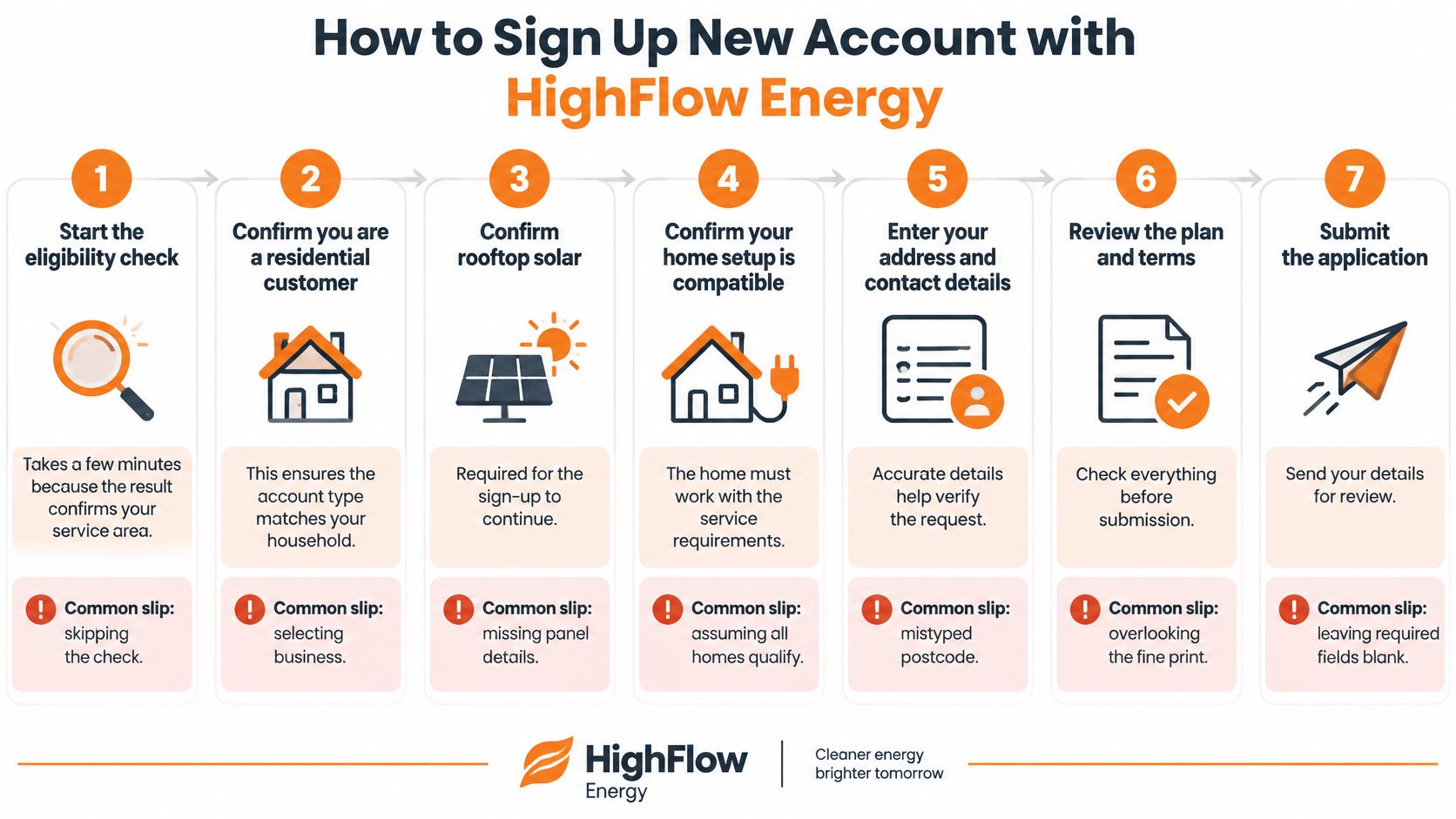
Complete the checks in sequence
Start with eligibility. Establish the service area and residential account type before completing the detailed application. The common slip is skipping this check and assuming an installed battery automatically qualifies.
Enter your legal identity and contact details. Use your legal name, date of birth, current contact information and preferred communication channel so records can be matched. A nickname, or naming a household member instead of the intended account holder, can create a mismatch.
Match the service address and NMI. Copy both from your electricity bill and check unit numbers, postcode and street spelling. The common slip is changing address abbreviations or entering the retailer account number instead of the NMI.
Provide complete battery and inverter details. Include make, model, full serial number and firmware version so compatibility, communications, export and control capability can be assessed. A cropped label photo or truncated serial number can leave the reviewer unable to identify the device.
Read and give explicit consent. Understand automated battery optimisation, grid-service participation, switching and relevant data sharing before accepting permissions. The common slip is approving control authority without checking what can be controlled and under which conditions.
Complete payment and life-support requirements. Direct debit arrangements can be made through our customer portal, while any required life-support form must follow the signed-document and email process. Don't assume a checkbox replaces the medical form, or that payment details entered elsewhere have transferred automatically.
Review the final summary before submitting. Check the account holder, connection, equipment, allowance information and control authority together, and save the application reference. The common slip is correcting individual fields without checking whether the final summary reflects those changes.
Understand what device verification establishes
A self-reported compatible battery still needs a separate technical check. The reviewer must connect the right household, meter and equipment before activation; an initial eligibility result doesn't establish that every device function is available.
In the National Electricity Market, wholesale prices can change sharply, while a household's retail charges follow its contract. Don't assume VPP participation means you personally receive wholesale prices or bear direct wholesale exposure.
Battery optimisation may shift charging or discharge around demand events, but network export limits and congestion still constrain operation. Ask how proposed cycling fits your battery warranty and whether a suitable household reserve remains available.
A complete application should leave you clear about who holds the account, which connection is enrolled and what control you're authorising.
Each field should have a purpose. Before submission, resolve any unclear allowance or authority wording rather than interpreting a successful form submission as final approval.
Fixing Common Sign-Up Errors
An address or NMI mismatch is a useful first check when an application stalls. A correctly spelled address can still differ from the format in electricity records, especially for units, subdivided properties or recently changed street addresses.
Sign-up symptoms, causes and fixes
| Symptom | Likely cause | Fix |
|---|---|---|
| Address or NMI does not match | Address format differs from the bill or records | Use the address shown on the bill and confirm the NMI against it |
| Concession not applied | Named account holder is not the eligible person | Name the eligible person as account holder or confirm the correct holder |
| Battery not accepted for VPP | Incomplete serial number or unsupported firmware | Enter the full serial, update firmware through the approved process, then resubmit |
| Duplicate device error | Battery already enrolled on another account | Contact support with the existing account details |
| Life support status not recognised | Form missing, unsigned or sent late | Return the signed form by email and keep a copy |
Correct the record, not just the error message
Say your bill lists a unit separately from the street number, but you've combined them in the application. Re-enter the bill's address format and confirm that the NMI belongs to that connection, rather than trying several nearby address suggestions.
For concessions, distinguish the legal account holder from other residents and authorised contacts. Confirm the eligible person and correct account arrangement before changing names just to get past a validation screen.
Technical failures need a different response. Don't install unofficial firmware or repeatedly enrol the battery under new accounts; use the manufacturer's supported update method and request manual review if identification remains unresolved.
Life-support customers who change address, retailer or equipment type must submit updated documentation to maintain registration and any applicable rebates. A previous registration shouldn't be treated as proof that the new account is correctly recorded.
Practical rule: Find the failed field, correct it once and keep the support reference and contact date. Repeatedly submitting unchanged information makes the request harder to track.
What Happens After You Submit Your Details
Suppose your application is complete and your battery details match the installation records. The next milestone is acceptance, followed by welcome information and activation steps, not an assumption that submitting the form immediately enables battery dispatch.
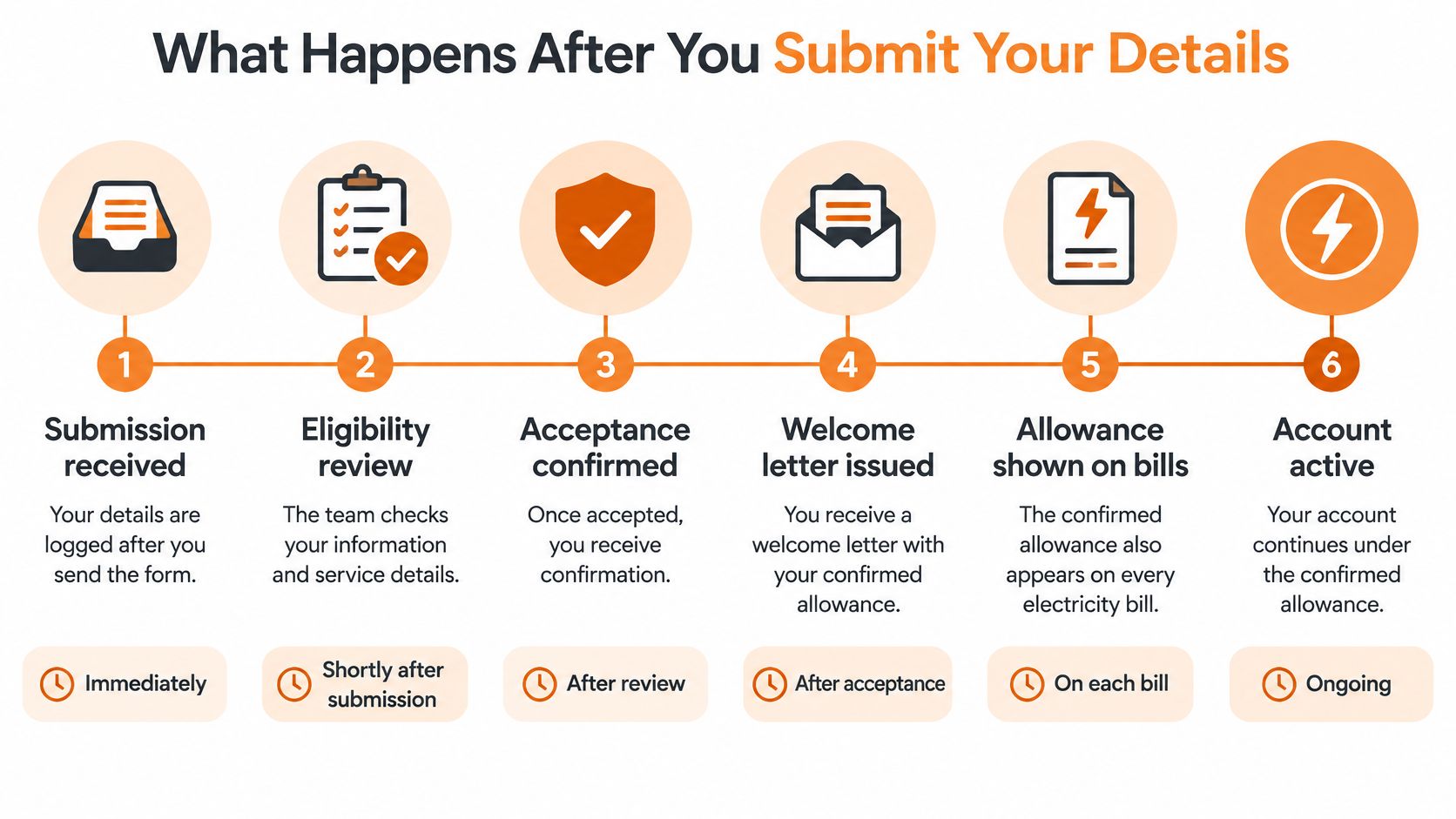
Post-submission stages and timing
| Stage | Typical timing | What to expect |
|---|---|---|
| Welcome letter | After the application is accepted | Confirmed allowance and key account details |
| Cooling-off period | Under HighFlow's policy, 10 business days from receiving the welcome letter | Time to review the terms and confirm the cancellation deadline |
| Meter installation | Within six business days of connection, or 15 days for a replacement, under the AER's reported metering requirements%202023.pdf) | Meter provided by your retailer where required |
| Device availability | Once the battery is online and activation checks are complete | Grid support only when the battery is available |
| First bill | At your account's first scheduled billing date | Allowance shown clearly on the bill |
The metering timeframes above are those described by the AER as applying from February 2019, not a promise of total application turnaround. If your existing meter is compliant, a new installation may not be necessary; confirm current requirements if metering work is scheduled.
Your confirmed allowance appears in your welcome information and on every electricity bill. Eligible concessions or rebates are automatically credited to your account.
Common questions after submission
Does submitting the form mean I'm approved?
No. Acceptance follows the relevant identity, connection and equipment checks.
When will my allowance be confirmed?
It's provided when you join. Use the written welcome information rather than an estimate.
Does my battery have to stay online?
It needs communications and availability for coordinated operation. An offline device can't respond to remote instructions.
Will I need a new electricity meter?
Not necessarily. The connection and existing meter determine whether work is needed.
Where can I monitor consumption?
Our customer portal lets you review electricity usage and consumption patterns.
What if progress stops?
Check the portal for available status information, then contact support with your application reference. Record the date and the specific outstanding check.
Start Your Eligibility Check Today
If you own a home in NSW or QLD with rooftop solar and a compatible battery, an eligibility check is the practical next step. It establishes whether progressing to detailed verification makes sense, without treating a working battery as automatic acceptance.
Before agreeing, make sure you understand the written allowance, extra-usage charges, operating permissions and relevant policies. Keep your application, contract and welcome documents until the cooling-off period ends, and retain the final account terms afterwards.
Key takeaways
- Prepare matching records: Use the legal account holder, bill address and correct NMI.
- Verify the equipment: Compatibility requires more than selecting a battery brand.
- Assess total value: Compare retail charges, household reserves and operating conditions, not just potential grid-service revenue.
- Keep evidence: Save consent records, device photos and application correspondence.
For independent context, the Australian Energy Regulator explains retail consumer protections, while the Australian Energy Market Operator, AEMO, provides information about electricity-system operation.
Most battery owners focus on installation quality. Far fewer focus on ongoing performance and optimisation. High Flow Energy is an electricity retailer built around unlocking the full value of your existing solar and battery system.
If you would like to understand whether your battery is underperforming financially, request an eligibility assessment today.
HighFlow Energy offers an electricity retail and coordinated VPP arrangement for eligible households with existing solar and battery systems. Visit HighFlow Energy to start your eligibility check and establish which account, meter and device details you'll need before joining.